General
PromptBeginner5 minmarkdown
Untitled Skill
193
Before getting started, check out the [BentoML community forum](https://forum.modular.com/c/bento/31).
Loading actions...
Main instructions and any bundled files for this skill.
Before getting started, check out the BentoML community forum.
If you are interested in contributing to existing issues and feature requests, check out the good-first-issue and help-wanted issues list.
If you are interested in proposing a new feature, make sure to create a new feature request ticket here and share your proposal in the #bentoml-contributors slack channel for feedback.
Make sure to have Git, pip, Python3.9+, and PDM installed.
Optionally, make sure to have GNU Make
available on your system if you aren't using a UNIX-based system for a better
developer experience. If you don't want to use make then please refer to
the Makefile for specific commands on a given make target.
Fork the BentoML project on GitHub.
Clone the source code from your fork of BentoML's GitHub repository:
git clone [email protected]:username/BentoML.git && cd BentoML
Add the BentoML upstream remote to your local BentoML clone:
git remote add upstream [email protected]:bentoml/BentoML.git
Configure git to pull from the upstream remote:
git switch main # ensure you're on the main branch
git fetch upstream --tags
git branch --set-upstream-to=upstream/main
Install BentoML in editable and all development dependencies:
pdm install -G all
pre-commit install
This installs BentoML with editable mode via pdm and development
dependencies in a isolated environment. If you wish not to setup within an
isolated environment, pass --no-isolation to pdm
Note: Make sure to prepend
pdm runto all commands within this guide if you are using isolated environment viapdm.
Test the BentoML installation either with bash:
bentoml --version
or in a Python session:
import bentoml
print(bentoml.__version__)
Confirm that you have the following installed:
Fork the BentoML project on GitHub.
Clone the GitHub repository:
Add an BentoML upstream remote:
Pull from the BentoML upstream remote to your main branch:
Open a new terminal by clicking the Terminal dropdown at the top of the window, followed by the 'New Terminal' option. Next, add a virtual environment with this command:
python -m venv .venv
Click yes if a popup suggests switching to the virtual environment. Otherwise, go through these steps:
Open any python file in the directory.
Select the interpreter selector on the blue status bar at the bottom of the editor.

Switch to the path that includes .venv from the dropdown at the top.
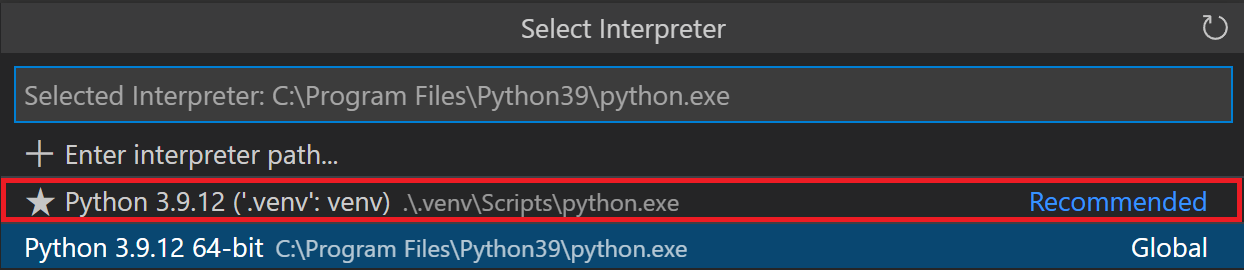
Update your PowerShell execution policies. Win+x followed by the 'a' key opens the admin Windows PowerShell. Enter the following command to allow the virtual environment activation script to run:
Set-ExecutionPolicy -ExecutionPolicy RemoteSigned -Scope CurrentUser
Make sure you're on the main branch.
git switch main
Use the git pull command to retrieve content from the BentoML Github repository.
git pull
Create a new branch and switch to it.
git switch -c my-new-branch-name
Make your changes!
Use the git add command to save the state of files you have changed.
git add <names of the files you have changed>
Commit your changes.
git commit
Push all changes to your fork on GitHub.
git push
Switch to the main branch:
Pull from the upstream remote:
Create and change to a new branch:
Make your changes!
Stage all your changes:
Commit your changes:
Push your changes:
To view internal debug loggings for development, set the BENTOML_DEBUG environment variable to TRUE:
export BENTOML_DEBUG=TRUE
And/or use the --verbose option when running bentoml CLI command, e.g.:
bentoml get IrisClassifier --verbose
We are using pre-commit to manage our hooks, and
buf for formatting and linting of our proto
files. Configuration can be found here. Currently, we
are running buf with docker, hence we kindly ask our developers to have docker
available. Docker installation can be found
here.
Run linter/format script:
pre-commit run --all-files
Run type checker:
make type
The proto files for the BentoML gRPC service are located under bentoml/grpc.
The generated python files are not checked in the git repository, and are instead generated via this script.
If you edit the proto files, make sure to run ./scripts/generate_grpc_stubs.sh to
regenerate the proto stubs.
Test out your changes in an actual BentoML model deployment, you can create a new Bento with your custom BentoML source repo:
pip install -e PATH_TO_THE_FORKexport BENTOML_BUNDLE_LOCAL_BUILD=Truebentoml build in your project directorybentoml containerize will install it to override the default BentoML installation in base imageIf you want other team members to easily use your custom BentoML distribution, you may publish your branch to your fork of BentoML, and have your users install it this way:
pip install git+https://github.com/{YOUR_GITHUB_USERNAME}/bentoml@{YOUR_REVISION}
And in your BentoML projects' bentofile.yaml, force the Bento to install this distribution, e.g.:
service: 'service:svc'
description: 'file: ./README.md'
include:
  - '*.py'
python:
  packages:
    - pandas
    - git+https://github.com/{YOUR_GITHUB_USERNAME}/bentoml@{YOUR_REVISION}
docker:
  system_packages:
    - git
Make sure to install all dev dependencies:
pdm install
BentoML tests come with a Pytest plugin. Export PYTEST_PLUGINS:
export PYTEST_PLUGINS=bentoml.testing.pytest.plugin
To run all tests with PDM, do the following:
pdm run nox
If you are adding new ML framework support, it is recommended that you also add a separate test suite in our CI. Currently we are using GitHub Actions to manage our CI/CD workflow.
We recommend using nektos/act to run and test Actions locally.
Add a new job for your new framework under framework.yml
Currently, BentoML is PEP518 compatible. We define package configuration via [pyproject.toml][https://github.com/bentoml/bentoml/blob/main/pyproject.toml].
BentoML has moved its benchmark to bentoml/benchmark.
Push changes to your fork and follow this article on how to create a pull request on github. Name your pull request with one of the following prefixes, e.g. "feat: add support for PyTorch". This is based on the Conventional Commits specification
Once your pull request is created, an automated test run will be triggered on your branch and the BentoML authors will be notified to review your code changes. Once tests are passed and a reviewer has signed off, we will merge your pull request.
Refer to BentoML Documentation Guide for how to build and write docs.
# Developer Guide Before getting started, check out the [BentoML community forum](https://forum.modular.com/c/bento/31). If you are interested in contributing to existing issues and feature requests, check out the [good-first-issue](https://github.com/bentoml/BentoML/issues?q=is%3Aopen+is%3Aissue+label%3Agood-first-issue) and [help-wanted](https://github.com/bentoml/BentoML/issues?q=is%3Aopen+is%3Aissue+label%3Ahelp-wanted) issues list. If you are interested in proposing a new feature, make sure to create a new feature request ticket [here](https://github.com/bentoml/BentoML/issues/new/choose) and share your proposal in the `#bentoml-contributors` slack channel for feedback. ## Start Developing <details><summary><h3>with the Command Line</h3></summary> 1. Make sure to have [Git](https://git-scm.com/), [pip](https://pip.pypa.io/en/stable/installation/), [Python3.9+](https://www.python.org/downloads/), and [PDM](https://pdm.fming.dev/latest/) installed. Optionally, make sure to have [GNU Make](https://www.gnu.org/software/make/) available on your system if you aren't using a UNIX-based system for a better developer experience. If you don't want to use `make` then please refer to the [Makefile](./Makefile) for specific commands on a given make target. 2. Fork the BentoML project on [GitHub](https://github.com/bentoml/BentoML). 3. Clone the source code from your fork of BentoML's GitHub repository: ```bash git clone [email protected]:username/BentoML.git && cd BentoML ``` 4. Add the BentoML upstream remote to your local BentoML clone: ```bash git remote add upstream [email protected]:bentoml/BentoML.git ``` 5. Configure git to pull from the upstream remote: ```bash git switch main # ensure you're on the main branch git fetch upstream --tags git branch --set-upstream-to=upstream/main ``` 6. Install BentoML in editable and all development dependencies: ```bash pdm install -G all pre-commit install ``` This installs BentoML with editable mode via `pdm` and development dependencies in a isolated environment. If you wish not to setup within an isolated environment, pass `--no-isolation` to pdm > **Note**: Make sure to prepend `pdm run` to all commands within this guide > if you are using isolated environment via `pdm`. 7. Test the BentoML installation either with `bash`: ```bash bentoml --version ``` or in a Python session: ```python import bentoml print(bentoml.__version__) ``` </details> <details><summary><h3>with VS Code</h3></summary> 1. Confirm that you have the following installed: - [Python3.9+](https://www.python.org/downloads/) - VS Code with the [Python](https://marketplace.visualstudio.com/items?itemName=ms-python.python) and [Pylance](https://marketplace.visualstudio.com/items?itemName=ms-python.vscode-pylance) extensions 2. Fork the BentoML project on [GitHub](https://github.com/bentoml/BentoML). 3. Clone the GitHub repository: 1. Open the command palette with Ctrl+Shift+P and type in 'clone'. 2. Select 'Git: Clone(Recursive)'. 3. Clone BentoML. 4. Add an BentoML upstream remote: 1. Open the command palette and enter 'add remote'. 2. Select 'Git: Add Remote'. 3. Press enter to select 'Add remote' from GitHub. 4. Enter https://github.com/bentoml/BentoML.git to select the BentoML repository. 5. Name your remote 'upstream'. 5. Pull from the BentoML upstream remote to your main branch: 1. Open the command palette and enter 'checkout'. 2. Select 'Git: Checkout to...' 3. Choose 'main' to switch to the main branch. 4. Open the command palette again and enter 'pull from'. 5. Click on 'Git: Pull from...' 6. Select 'upstream'. 6. Open a new terminal by clicking the Terminal dropdown at the top of the window, followed by the 'New Terminal' option. Next, add a virtual environment with this command: ```bash python -m venv .venv ``` 7. Click yes if a popup suggests switching to the virtual environment. Otherwise, go through these steps: 1. Open any python file in the directory. 2. Select the interpreter selector on the blue status bar at the bottom of the editor.  3. Switch to the path that includes .venv from the dropdown at the top.  8. Update your PowerShell execution policies. Win+x followed by the 'a' key opens the admin Windows PowerShell. Enter the following command to allow the virtual environment activation script to run: ``` Set-ExecutionPolicy -ExecutionPolicy RemoteSigned -Scope CurrentUser ``` </details> ## Making Changes <details><summary><h3>using the Command Line</h3></summary> 1. Make sure you're on the main branch. ```bash git switch main ``` 2. Use the git pull command to retrieve content from the BentoML Github repository. ```bash git pull ``` 3. Create a new branch and switch to it. ```bash git switch -c my-new-branch-name ``` 4. Make your changes! 5. Use the git add command to save the state of files you have changed. ```bash git add <names of the files you have changed> ``` 6. Commit your changes. ```bash git commit ``` 7. Push all changes to your fork on GitHub. ```bash git push ``` </details> <details><summary><h3>using VS Code</h3></summary> 1. Switch to the main branch: 1. Open the command palette with Ctrl+Shift+P. 2. Search for 'Git: Checkout to...' 3. Select 'main'. 2. Pull from the upstream remote: 1. Open the command palette. 2. Enter and select 'Git: Pull...' 3. Select 'upstream'. 3. Create and change to a new branch: 1. Type in 'Git: Create Branch...' in the command palette. 2. Enter a branch name. 4. Make your changes! 5. Stage all your changes: 1. Enter and select 'Git: Stage All Changes...' in the command palette. 6. Commit your changes: 1. Open the command palette and enter 'Git: Commit'. 7. Push your changes: 1. Enter and select 'Git: Push...' in the command palette. </details> ## Run BentoML with verbose/debug logging To view internal debug loggings for development, set the `BENTOML_DEBUG` environment variable to `TRUE`: ```bash export BENTOML_DEBUG=TRUE ``` And/or use the `--verbose` option when running `bentoml` CLI command, e.g.: ```bash bentoml get IrisClassifier --verbose ``` ## Style check, auto-formatting, type-checking We are using [pre-commit](https://pre-commit.com/) to manage our hooks, and [buf](https://github.com/bufbuild/buf) for formatting and linting of our proto files. Configuration can be found [here](./src/bentoml/grpc/buf.yaml). Currently, we are running `buf` with docker, hence we kindly ask our developers to have docker available. Docker installation can be found [here](https://docs.docker.com/get-docker/). Run linter/format script: ```bash pre-commit run --all-files ``` Run type checker: ```bash make type ``` ## Editing proto files The proto files for the BentoML gRPC service are located under [`bentoml/grpc`](./bentoml/grpc/). The generated python files are not checked in the git repository, and are instead generated via this [`script`](./scripts/generate_grpc_stubs.sh). If you edit the proto files, make sure to run `./scripts/generate_grpc_stubs.sh` to regenerate the proto stubs. ## Deploy with your changes Test out your changes in an actual BentoML model deployment, you can create a new Bento with your custom BentoML source repo: 1. Install custom BentoML in editable mode. e.g.: - git clone your bentoml fork - `pip install -e PATH_TO_THE_FORK` 2. Set env var `export BENTOML_BUNDLE_LOCAL_BUILD=True` 3. Build a new Bento with `bentoml build` in your project directory 4. The new Bento will include a wheel file built from the BentoML source, and `bentoml containerize` will install it to override the default BentoML installation in base image ### Distribute a custom BentoML release for your team If you want other team members to easily use your custom BentoML distribution, you may publish your branch to your fork of BentoML, and have your users install it this way: ```bash pip install git+https://github.com/{YOUR_GITHUB_USERNAME}/bentoml@{YOUR_REVISION} ``` And in your BentoML projects' `bentofile.yaml`, force the Bento to install this distribution, e.g.: ```yaml service: 'service:svc' description: 'file: ./README.md' include: - '*.py' python: packages: - pandas - git+https://github.com/{YOUR_GITHUB_USERNAME}/bentoml@{YOUR_REVISION} docker: system_packages: - git ``` ## Testing Make sure to install all dev dependencies: ```bash pdm install ``` BentoML tests come with a Pytest plugin. Export `PYTEST_PLUGINS`: ```bash export PYTEST_PLUGINS=bentoml.testing.pytest.plugin ``` To run all tests with PDM, do the following: ```bash pdm run nox ``` ### Adding new test suite If you are adding new ML framework support, it is recommended that you also add a separate test suite in our CI. Currently we are using GitHub Actions to manage our CI/CD workflow. We recommend using [`nektos/act`](https://github.com/nektos/act) to run and test Actions locally. Add a new job for your new framework under [framework.yml](./.github/workflows/frameworks.yml) ## Python tools ecosystem Currently, BentoML is [PEP518](https://www.python.org/dev/peps/pep-0518/) compatible. We define package configuration via [`pyproject.toml`][https://github.com/bentoml/bentoml/blob/main/pyproject.toml]. ## Benchmark BentoML has moved its benchmark to [`bentoml/benchmark`](https://github.com/bentoml/benchmark). ## Creating Pull Requests on GitHub Push changes to your fork and follow [this article](https://help.github.com/en/articles/creating-a-pull-request) on how to create a pull request on github. Name your pull request with one of the following prefixes, e.g. "feat: add support for PyTorch". This is based on the [Conventional Commits specification](https://www.conventionalcommits.org/en/v1.0.0/#summary) - feat: (new feature for the user, not a new feature for build script) - fix: (bug fix for the user, not a fix to a build script) - docs: (changes to the documentation) - style: (formatting, missing semicolons, etc; no production code change) - refactor: (refactoring production code, eg. renaming a variable) - perf: (code changes that improve performance) - test: (adding missing tests, refactoring tests; no production code change) - chore: (updating grunt tasks etc; no production code change) - build: (changes that affect the build system or external dependencies) - ci: (changes to configuration files and scripts) - revert: (reverts a previous commit) Once your pull request is created, an automated test run will be triggered on your branch and the BentoML authors will be notified to review your code changes. Once tests are passed and a reviewer has signed off, we will merge your pull request. ## Documentations Refer to [BentoML Documentation Guide](./docs/README.md) for how to build and write docs.
TypeScript and ESLint rules that MUST be followed when creating, modifying, or reviewing any file under apps/frontend/, including .ts, .tsx, .js, and .jsx files. Also apply when discussing frontend li...
risks